
Site Map
Technology Tips
WVLS Tech News
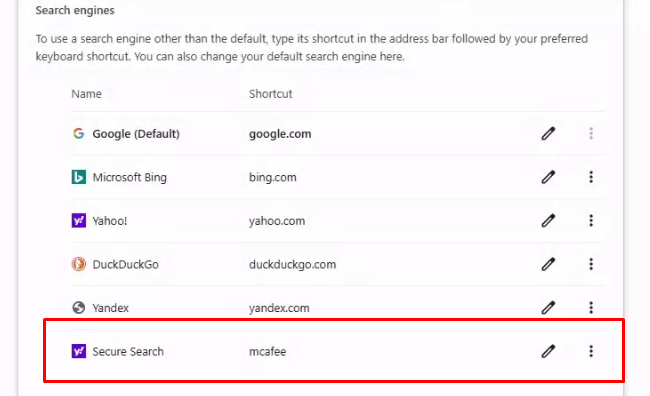
Browser Hijackers
We have encountered several instances of a Chrome browser hijacker on computers in the last couple of weeks. I am asking you to check your Chrome browsers, especially if you have noted "weirdness," re-directed searches, or pop-ups. There are two places browser...

WARNING: WebinarTV and AI recordings of “public” virtual meetings
Background: A webinar hosting platform (WebinarTV.us) is using publicly posted virtual meeting links to find and record meetings and then post them online on the website (and by public, it can be "shared via email only," but meetings don't require a password to join)....
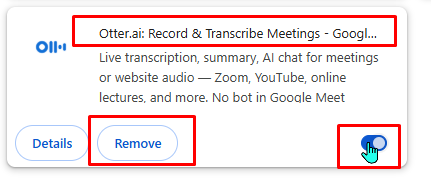
Remove Browser Extensions
Browser extensions - especially in Google Chrome - can be problematic. They can be a source of browser hijacking can share user information (agreed to in terms of agreement) that a general user is often unaware of. The steps for reviewing and removing extensions in...
WVLS Technology Services
Care and Maintenance of your (Dell) Computers
Based on experience with most computer ticket issues, most problems could be solved/prevented with a few actions to keep your computer comfortable, updated, and refreshed. These are some tips and general best practices for computer care and maintenance.

Staffing Changes Form
WVLS is introducing a means for member libraries to report staffing changes to WVLS. This form is for reporting new hires, current employees witch significant job role changes, departing employees.
DeepFreeze Public Computer Restore
Learn about how DeepFreeze restore software maintains a clean configuration for library public computers.

Pharos Public PC Timing Software
Learn more about Pharos Public PC timing software.

Princh Print Management
Want to get started with Princh print management at your library? Read more here!
Technology Procurement Online Request Form
Submit your library’s technology procurement requests through an online form!
Technology Tips
Our partners at the NWLS IT department regularly publish “Tech Tips.” They have agreed to share them with us here – and WVLS IT staff will add some of our own. Thank you, Tony and Robert!
Windows Tech Tips
- lRestarting Your Computer ("When in doubt, shut it down.")
- lChanging Taskbar Settings in Windows 11
- lWindows Updates
- lMultiple Screens/Monitors
- lKeyboard Shortcuts
- l“Other User” (signing into a computer with a different library user account)
- lChanging Sleep & Power Settings on your Computer
- lChanging Startup Apps
- lSetting a Default Printer
Web Browser Tech Tips
- lBookmarking Websites
- lReopen a Closed Tab
- lDifferences Between Web Browsers
- lChanging Your Default Web Browser
- lCreating a Desktop Shortcut to a Website
- lSetting Homepages in Google Chrome
- l Setting Homepages in Microsoft Edge
- lSetting Homepages in Firefox
- lExporting/Backing up Chrome Bookmarks
- lClearing Browser Cache
- lUsing Private or Incognito Window